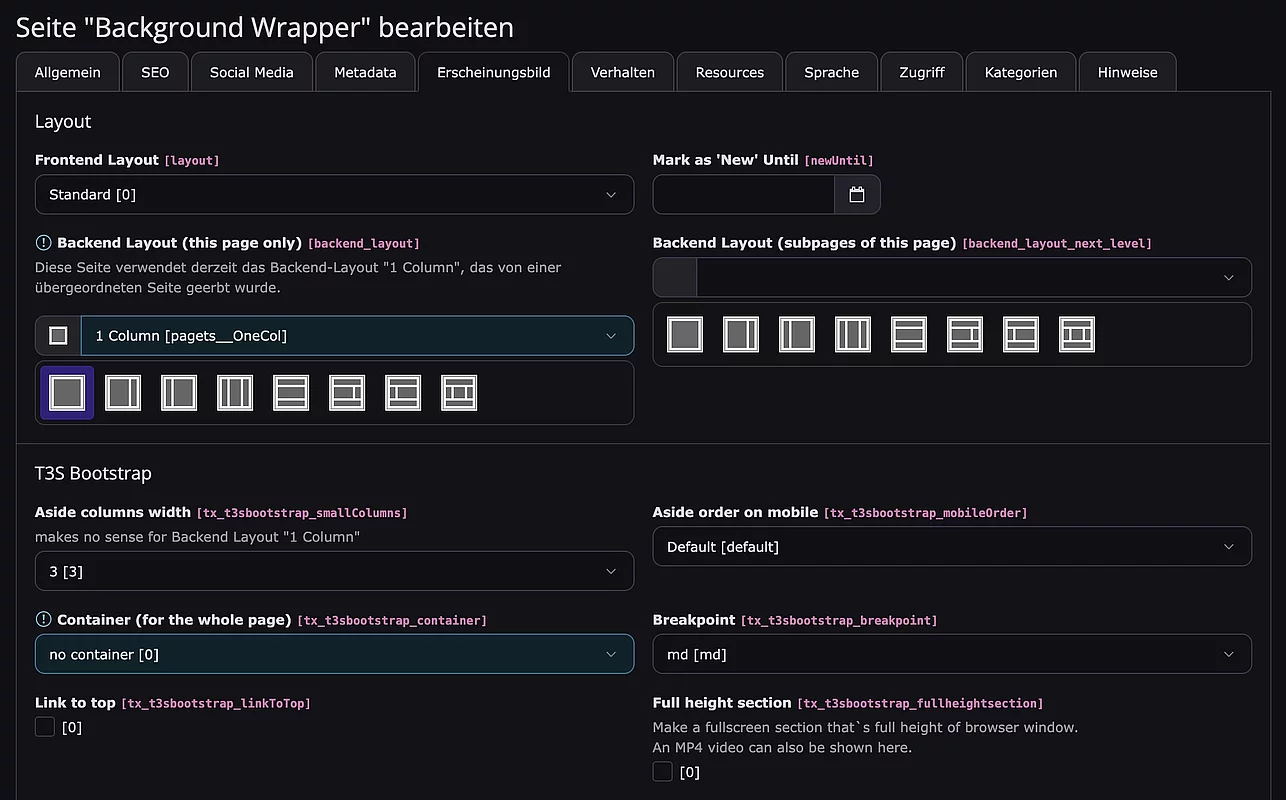
Der “Background-Wrapper” ist das entscheidende Werkzeug, um das starre Spaltenlayout aufzubrechen und moderne Full-Width-Sektionen mit zentriertem Inhalt zu erstellen.
Hierfür unter “Seite bearbeiten” folgende Einstellung vornehmen:
Backend Layout: 1 Column
Container: no container
In Abhängigkeit der Media-Datei (kein Media / Image / Local Video / Youtube oder Vimeo Video) werden entsprechende Tabs in der Flexform angezeigt.
Nach Änderung der Media-Datei ist ein Speichern nötig, damit der passende Tab erscheint!
Abhängige Tabs der tx_t3sbootstrap_flexform:
Tab “NoImage”
| Padding (top and bottom in rem) | noMediaPaddingTopBottom |
Tab “Image”
| Image inside | kein Hintergrundbild, sondern ein echtes Bild | origImage |
| max. Image width | max. Bildbreite in px | width |
| Background-attachment - fixed | fixiert ein Hintergrundbild relativ zum Viewport | bgAttachmentFixed |
| Enable content overlay and autoheight for background-image (JS) | automatische Höhe (des Content) & Option für zusätzliche Höhe | enableAutoheight |
| Padding (top and bottom in rem) | Abstand nach oben und unten | paddingTopBottom |
| Grayscale | CSS filter-Eigenschaft “Graustufen” | imgGrayscale |
| Sepia | CSS filter-Eigenschaft “nostalgischen Vintage-Look“ | imgSepia |
| Opacity | CSS filter-Eigenschaft “Graustufen” | imgOpacity |
| Raster over the image/color | Ein Raster wird über das Hintergrundbild oder -farbe gelegt | imageRaster |
Tab “Local Video”
| Controls | Videosteuerung | localControls |
| Loop | Video läuft in einer Schleife | loop |
| Mute | stummschalten | mute |
| Aspect ratio | z.B.: 37by9 == 9/37 || 37:9 | aspectRatio |
| Align content items | Inhaltselemente ausrichten | alignVideoItem |
| Extra vertical shift for the video | z.B.: 100 oder -100 | shift |
| Extra horizontal shift for the video on mobile (max-width:767px) | z.B.: 100 oder -100 | horizontalShift |
| Max. hight on mobile (max-width:767px) | max. Höhe in px auf dem Mobile | mobileHeight |
| Mobile width for higher videos on mobile (max-width:767px) | mobileWidth |
Tab “YouTube/Vimeo”
| Content Position | Inhaltselemente ausrichten | contentPosition |
| Height in px | Höhe in px | bgHeight |
| Extra shift for the video | z.B.: -100 or 100 (default = 50) | ytshift |
| Mute | automatisch aktiviert mit Autoplay | videoMute |
| Controls | Videosteuerung | videoControls |
| Loop | Video läuft in einer Schleife | videoLoop |